
Large language models become useful software agents when the surrounding application can give them controlled access to context and tools. A model can draft a message from its parameters alone, but booking a meeting, reading a customer record, or checking a repository requires an integration layer with permissions, schemas, transport rules, and user consent.
The Model Context Protocol (MCP) is an open protocol introduced by Anthropic in November 2024 for connecting AI applications to external data sources, tools, and prompt templates through a shared client-host-server architecture. Instead of building a custom integration for every combination of AI app and external service, developers can implement an MCP server once and expose its capabilities to MCP-compatible hosts.
MCP builds on existing concepts like tool use and function calling, wrapping them in a consistent protocol with capability negotiation, typed messages, and standard transports. Safety still comes from the host application: authorization, user consent, sandboxing, and careful tool design remain part of the production boundary.
What Is MCP in AI?
Model Context Protocol (MCP) is a standard way for AI applications to discover and call external tools, read contextual resources, and reuse prompt templates. An MCP host runs the LLM, an MCP client manages one server connection, and an MCP server exposes a bounded set of capabilities over JSON-RPC transports.
The protocol matters because tool use needs more than a function name. A reliable agent stack needs capability discovery, input schemas, transport behavior, lifecycle rules, and security boundaries that stay consistent across many tools and applications.
What Is an MCP Server?
An MCP server is a local process or remote service that publishes capabilities to an AI application. A server may wrap a database, repository, ticketing system, browser automation layer, internal API, or document store. It describes what it can do, receives structured requests from a client, performs the bounded operation, and returns structured results.
Servers can expose three main primitives:
| Primitive | Purpose | Example |
|---|---|---|
| Tools | Actions the model can request. | Query a database, create a ticket, run a search. |
| Resources | Context the model can read. | File contents, API records, retrieved documents. |
| Prompts | Reusable instruction templates. | A code-review prompt, support triage prompt, or report template. |
MCP Server vs MCP Client
The client and server sit on opposite sides of the protocol boundary.
| Component | Runs inside | Main responsibility |
|---|---|---|
| MCP host | User-facing AI application. | Orchestrates the LLM, user consent, permissions, and context aggregation. |
| MCP client | Host process. | Maintains one isolated session with one server and routes JSON-RPC messages. |
| MCP server | Local process or remote service. | Exposes tools, resources, and prompts for a focused external system. |
The one-client-to-one-server pattern keeps server connections isolated. A host can connect to many servers, but each client session has a clear boundary for capability negotiation, messages, and lifecycle state.
Architecture and Components
MCP follows a client-host-server architecture. The host can create multiple client instances, and each client maintains an isolated one-to-one connection with a server.
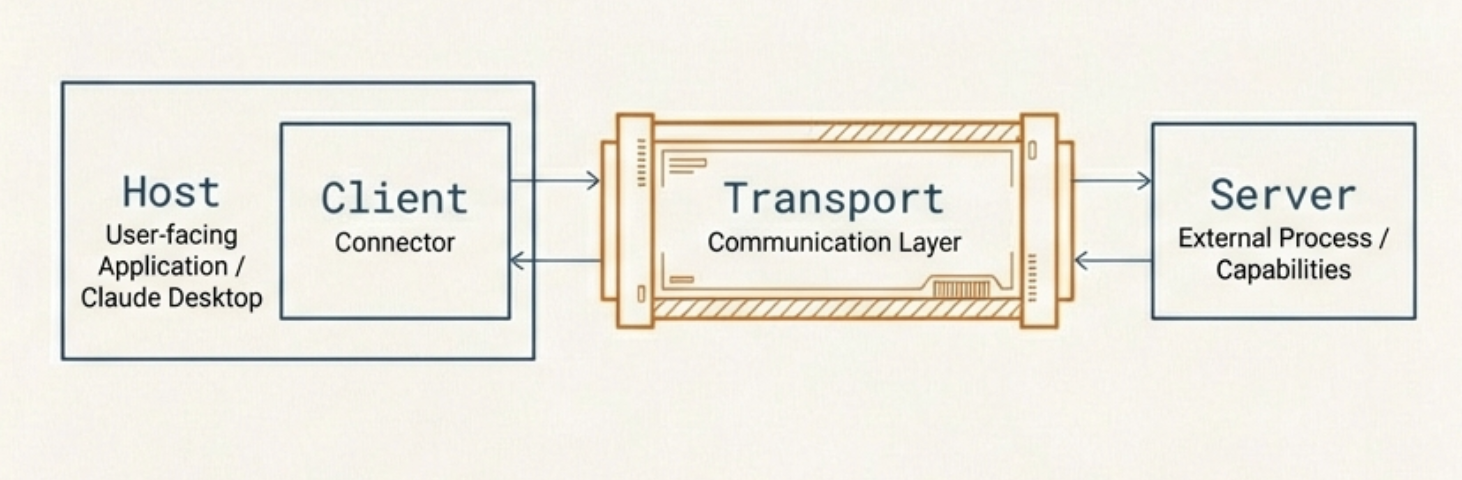
Host
The host is the application the user interacts with, such as Claude Desktop, an IDE plugin, or a custom AI application. It contains the LLM and orchestrates the overall workflow. When a user makes a request that requires external data or tools, the host coordinates with MCP clients to fulfill it.
Client
The client lives inside the host and manages the connection between the LLM and one or more MCP servers. Each client maintains a one-to-one connection with a specific server. It translates the LLM's requests into MCP protocol messages and converts server responses back into a format the LLM can process. It also handles discovery of available servers and their capabilities.
Server
The server is an external process that exposes specific capabilities to the LLM. It connects to external systems like databases, APIs, or file systems, and provides them to the client in a standardized format. Servers can expose three types of capabilities:
- Tools: Actions the LLM can invoke, such as querying a database or sending an email
- Resources: Data the LLM can read, such as file contents or API responses
- Prompts: Predefined templates that guide the LLM for specific tasks
Transport Layer
The transport layer handles communication between the client and server using JSON-RPC 2.0 messages. MCP supports two transport methods:
- Standard input/output (stdio): Used for local servers running on the same machine. The client launches the server as a subprocess and communicates through stdin/stdout. This is simple and fast, with no network overhead.
- Streamable HTTP: Used for remote servers. The client sends JSON-RPC messages to a single server endpoint over HTTP POST and receives either JSON responses or optional Server-Sent Events (SSE) streams. In the 2025-06-18 specification, Streamable HTTP replaces the earlier HTTP+SSE transport from protocol version 2024-11-05.
How MCP Works Step by Step
When a user sends a request to an MCP-enabled application, the flow works as follows:
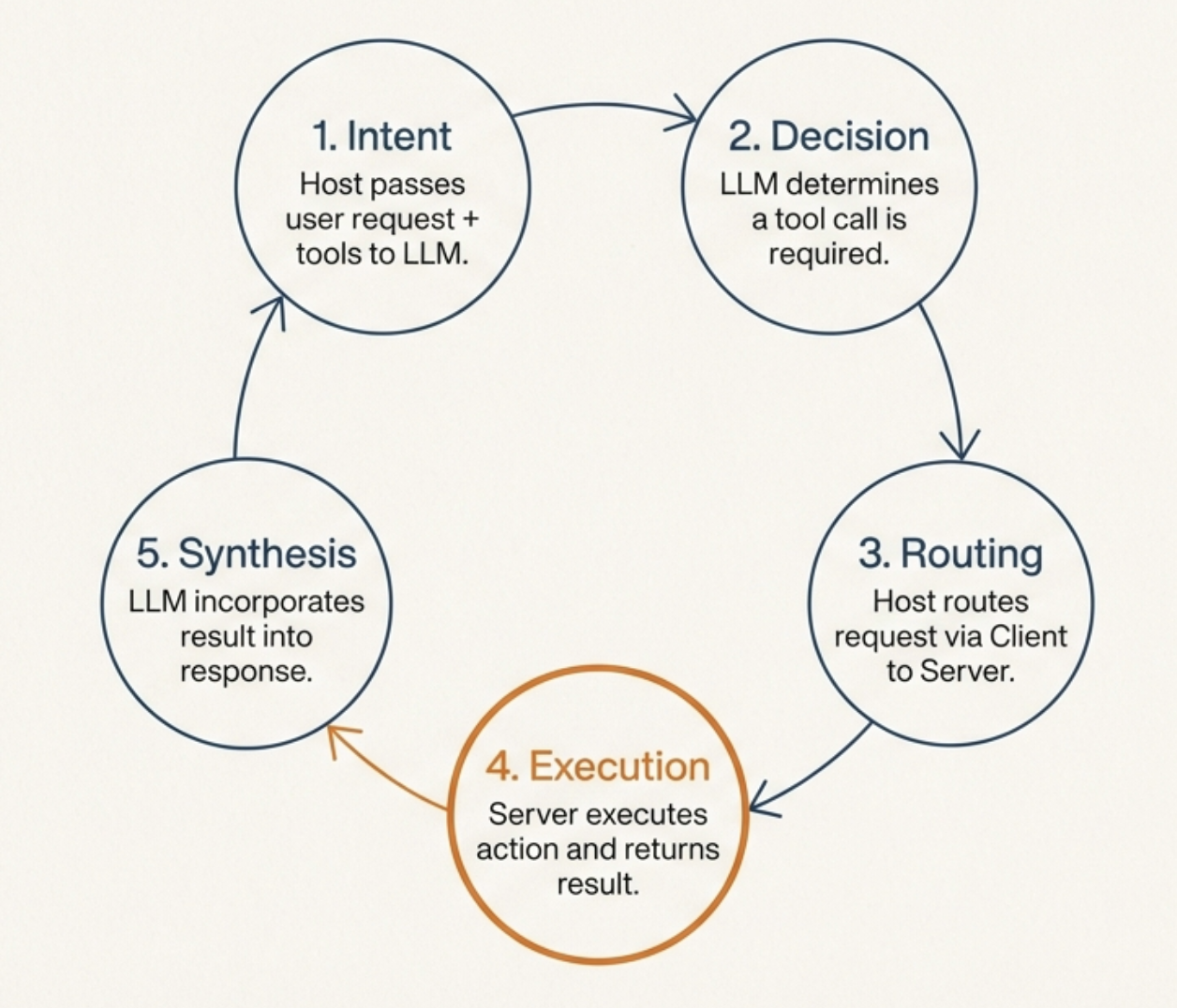
- The host passes the user's request to the LLM along with descriptions of available tools from connected MCP servers.
- The LLM analyzes the request and determines whether it needs to call any tools.
- If a tool call is needed, the LLM returns a structured tool-call request to the host.
- The host routes the request through the appropriate MCP client to the corresponding MCP server.
- The server executes the action (e.g., queries a database) and returns the result.
- The result is passed back through the client to the LLM, which incorporates it into its response.
- The final response is presented to the user.
This loop can repeat multiple times within a single interaction if the LLM needs to call several tools or chain actions together.
Why It Matters
Without a shared protocol, every integration between an AI application and an external service tends to require custom glue code. With AI hosts and services, the integration surface can become . MCP aims for an shape: hosts implement MCP client behavior, services expose MCP servers, and the protocol handles discovery and message exchange.
That standardization helps developers build reusable connectors. It also moves security questions into sharper focus. A good MCP host must show users which tools are exposed, request confirmation for sensitive operations, enforce authorization, and isolate servers so one integration does not silently gain access to another server's context.
References
- Model Context Protocol. Architecture, version 2025-06-18.
- Model Context Protocol. Transports, version 2025-06-18.
- Model Context Protocol. Tools.
- Model Context Protocol. Resources.
- Model Context Protocol. Prompts.