
If you’ve asked, “Can I run OpenClaw on my laptop, or need a server rack?” — good news: you likely need less hardware than you think.
The trick is understanding what kind of work OpenClaw is actually doing in your setup. Most OpenClaw workloads are orchestration-heavy: calling APIs, handling tool invocations, waiting on network responses, and managing context. So bottlenecks are often RAM, I/O behavior, and uptime discipline, not just processor speed.
Practical sizing depends on the workload class: local orchestration, always-on automation, code/build loops, deep research, or actual model training/inference.
Assumptions as of May 2026: official OpenClaw requirements are modest for the orchestrator itself (2 GB RAM minimum, 4 GB recommended, 1 core minimum, 2+ cores recommended). The larger recommendations below are planning estimates for real workloads, concurrency, logs, caches, uptime, and optional local model usage. They are not benchmark results.
---
TL;DR (If You Just Want the Short Answer)
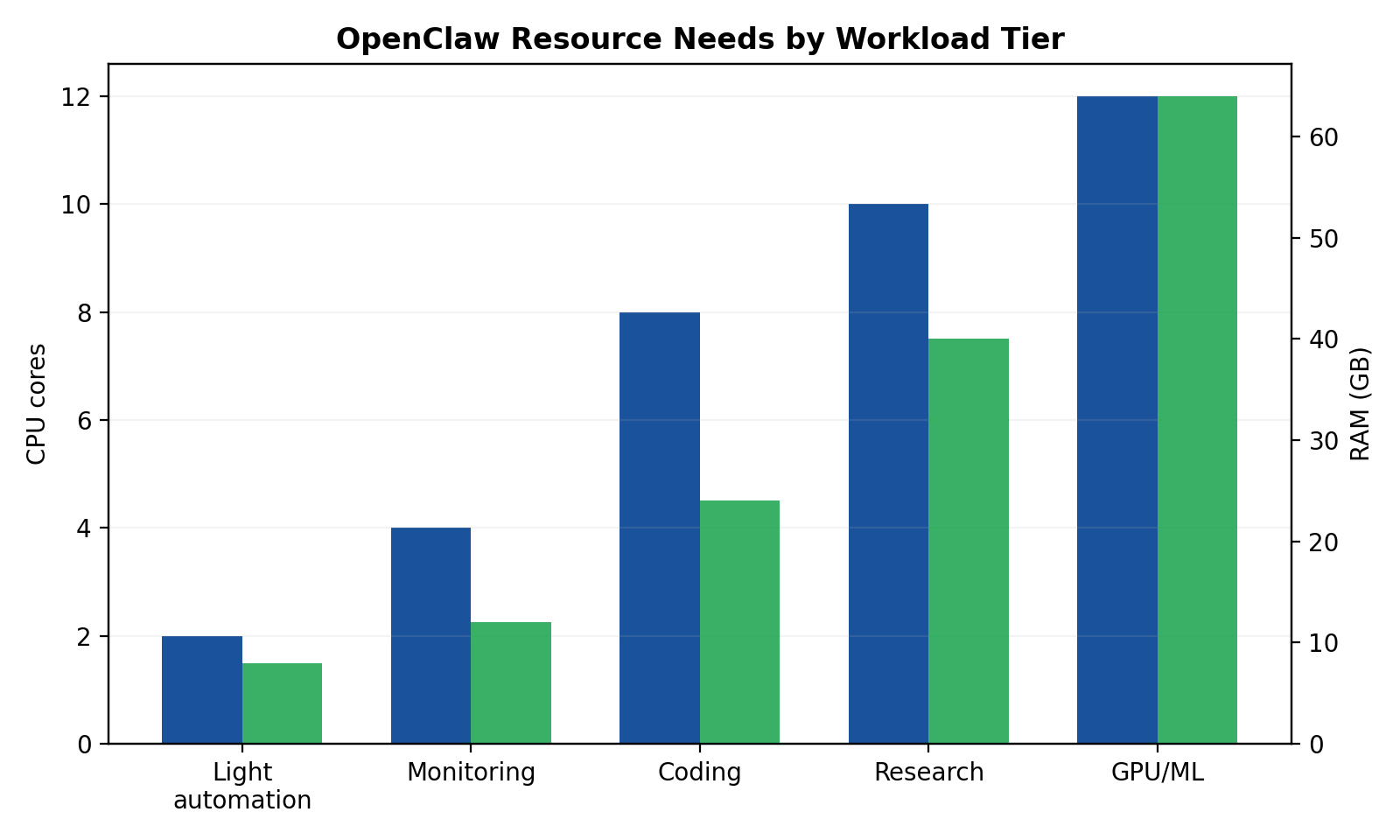
The resource-tier visual is a planning heuristic, not a measured benchmark.
- Very light personal automation (news, reminders, schedule):
- 2–4 cores, 8 GB RAM, 20–40 GB free storage is fine.
- A laptop or base mini PC is enough.
- Website monitoring + alerts:
- 4 cores, 8–16 GB RAM, SSD, reliable internet, always-on preferred.
- If you need 24/7 reliability, move this off your daily laptop.
- Coding workflows:
- 6–12 cores, 16–32 GB RAM, fast SSD.
- Local is great for iteration; add a server runner for long jobs.
- Deep research (long contexts, many tool calls):
- 8+ cores, 32+ GB RAM, very fast SSD, stable network.
- Hybrid setup usually wins: local control + server execution.
- ML training/inference:
- CPU/RAM guidance is secondary; GPU becomes the real requirement.
- For serious work, rent cloud GPU or run a dedicated GPU box.
---
First Principle: Size for Workflow, Not for Hype
People over-buy hardware because they imagine the “worst possible” AI workload all day long. In practice, most OpenClaw sessions are bursty:
- Think → call tool → wait
- Fetch data → parse → summarize
- Launch subtask → idle
Even when it feels busy, your machine may be spending a lot of time on network waits rather than pegging all cores.
So don’t ask “What hardware runs OpenClaw?” Ask: “What mix of tasks does my OpenClaw do in a normal week?”
That’s the basis for sane sizing.
---
Workload Tier 1: Very Light Use (News collection, schedule management, reminders)
Typical pattern
- Pull RSS/news feeds a few times per day
- Check calendar and reminders
- Send short summaries/notifications
- Minimal local processing, mostly API calls and lightweight parsing
Hardware target
- CPU: 2–4 modern cores
- RAM: 8 GB minimum (16 GB if you multitask heavily)
- Storage: 20–40 GB free SSD
- Network: Any stable broadband; low bandwidth needs
- Uptime expectation: Doesn’t need true 24/7 (unless you want strict hourly checks)
Real-world devices that work
- Mid-range laptop from last 5 years
- Base Mac mini
- NUC-style mini PC
- Even older hardware can work if disk is SSD and RAM isn’t cramped
Opinionated take
If this is your use case, don’t buy new hardware. Use what you already own. Your biggest improvement will come from better scheduling and fewer noisy automations, not from adding cores.
---
Workload Tier 2: Website Monitoring + Alerts
Typical pattern
- Poll websites/APIs every 1–15 minutes
- Diff content or check status endpoints
- Trigger alerts (message/email/webhook)
- Possibly monitor multiple targets in parallel
What changes vs Tier 1
This is still a light compute problem, but reliability matters more:
- More concurrent jobs
- More logs and history
- More sensitivity to missed checks
Hardware target
- CPU: 4 cores is a comfortable baseline
- RAM: 8 GB minimum, 16 GB preferred for many monitors
- Storage: 50+ GB SSD (logs/history can grow)
- Network: Stable connection + low outage frequency
- Uptime expectation: 24/7 strongly recommended
Deployment guidance
- Running this on your personal laptop works for testing.
- Running this long-term on your personal laptop is asking for missed alerts when you sleep, travel, reboot, or close the lid.
Opinionated take
For monitoring, the hardware can be small, but the runtime should be boring and always on. Reliability beats raw speed. A modest always-on mini box or cheap VPS usually outperforms a powerful but intermittently-online laptop.
---
Workload Tier 3: Coding / Programming Workflows
Typical pattern
- Repo operations (clone, branch, commit, diff)
- Build/test loops
- Linting, static checks
- Tool-heavy agent workflows
- Potential subagents running tasks in parallel
What actually consumes resources
- Local builds (language/toolchain dependent)
- Test execution
- Indexing/search across codebases
- Multiple terminal processes and background runs
Hardware target
- CPU: 6–12 performance cores (or equivalent hybrid mix)
- RAM: 16 GB workable; 32 GB strongly preferred for comfort
- Storage: 100+ GB fast SSD (code + caches + artifacts)
- Network: Good upload/download helps dependency install and CI interactions
- Uptime expectation: Medium to high (especially for background jobs)
Laptop vs workstation reality
- Laptop: Great for active dev sessions and interactive work.
- Workstation/server: Better for long build pipelines, overnight refactors, and jobs you don’t want tied to battery/thermal limits.
Opinionated take
For coding, RAM is where people cheap out and regret it. If budget only lets you upgrade one thing, upgrade memory first, then SSD speed, then CPU.
---
Workload Tier 4: Deep Research (Long-context synthesis, many tool calls)
Typical pattern
- Pull large amounts of source material
- Multi-step tool orchestration
- Long-context synthesis and structured outputs
- Many intermediate artifacts and retries
Why this feels “heavy”
Even when model inference is remote, deep research can stress your local runtime through:
- Large transient context payload handling
- Concurrent tool outputs
- Disk churn from temp files/logs
- Queue buildup when multiple tasks overlap
Hardware target
- CPU: 8+ modern cores
- RAM: 32 GB baseline; 64 GB if you run many parallel research tracks
- Storage: 200+ GB fast NVMe (or very fast SSD) for cache/temp/workspace
- Network: Strongly stable, low jitter, decent upstream bandwidth
- Uptime expectation: High (long-running sessions can span hours)
Deployment guidance
This is where hybrid architecture usually becomes worth it:
- Local machine for control, drafting, and iteration
- Server/VPS for long-running workers, scraping, and scheduled tasks
Opinionated take
Deep research breaks sloppy ops before it breaks hardware. The first failures are usually queue backlogs, context bloat, or rate limits — not CPU max-out. Build backpressure and sensible task chunking before you buy bigger machines.
---
Workload Tier 5: ML Workloads (GPU training/inference)
Typical pattern
- Fine-tuning, embedding pipelines, batch inference
- Running local models at meaningful speed
- Data preprocessing + model serving
The key truth
Once you step into real ML workloads, this stops being a normal “OpenClaw hardware” conversation and becomes a GPU infrastructure conversation.
Hardware target (host side)
- CPU: 8–16 cores (feeding GPU/data pipeline)
- RAM: 32–64 GB
- Storage: 500 GB+ SSD/NVMe (datasets and model artifacts grow fast)
- Network: High-throughput if moving data/models frequently
- Uptime expectation: High, especially for training runs
GPU guidance (practical)
- Light local inference: consumer GPU with enough VRAM for chosen models
- Serious inference at scale: higher VRAM, stronger cooling/power, stable deployment environment
- Training/fine-tuning: often cheaper and easier to burst to cloud GPUs than owning idle hardware
Opinionated take
Do not buy a big GPU “just in case.” If you don’t have sustained weekly GPU demand, rent first. Hardware ownership makes sense when utilization is real, predictable, and long-term.
---
Deployment Context Comparison: Laptop vs Desktop/Workstation vs Mac mini vs Server
1) Laptop
Best for: personal workflows, coding on the go, low-to-medium automation
Pros
- Already owned
- Great interactive experience
- No extra infrastructure overhead
Cons
- Not always-on
- Thermal throttling under long loads
- Sleep/reboots interrupt automation
Use when: You’re still validating workflows and don’t require strict uptime.
---
2) Desktop / Workstation
Best for: heavy coding, local compute, multi-tool workflows
Pros
- Better sustained performance and thermals
- Easier storage/RAM expansion (especially non-Apple ecosystems)
- Better for parallel workloads
Cons
- Higher upfront cost
- Still local power/network dependent
Use when: You do intensive local work daily and need stability/performance beyond laptop limits.
---
3) Mac mini
Best for: always-on, low-power, quiet home/office automation hub
Pros
- Excellent power efficiency
- Reliable always-on profile
- Strong single-device bridge between local and server-like behavior
Cons
- Less flexible upgrade path post-purchase
- Not ideal for heavy GPU ML tasks
Use when: You want a “set-and-forget” OpenClaw node without running a full server stack.
---
4) Server (VPS, dedicated, or cloud instance)
Best for: uptime-critical workflows, team use, scalable automation, heavy background processing
Pros
- True 24/7 availability
- Better isolation from your personal machine lifecycle
- Easy to scale horizontally/vertically
Cons
- Ongoing monthly cost
- More ops burden (security, monitoring, backups)
- Latency and debugging complexity for hybrid setups
Use when: Missing jobs or interrupted workflows have real cost, or your workload has outgrown personal-device reliability.
---
Practical Sizing Matrix (Use This, Don’t Overthink It)
| Workload | CPU | RAM | Storage (free) | Network | Uptime target |
|---|---|---|---|---|---|
| Very light automation | 2–4 cores | 8 GB | 20–40 GB SSD | Basic stable broadband | Best-effort |
| Monitoring + alerts | 4 cores | 8–16 GB | 50+ GB SSD | Stable, low outages | 24/7 preferred |
| Coding workflows | 6–12 cores | 16–32 GB | 100+ GB fast SSD | Good general broadband | Daily + long jobs |
| Deep research | 8+ cores | 32–64 GB | 200+ GB NVMe/SSD | Stable + strong upstream | High |
| ML + GPU workloads | 8–16 cores | 32–64+ GB | 500+ GB NVMe | High throughput | High/continuous |
If you’re between tiers, choose the lower tier and fix workflow inefficiencies first.
---
Cost Tiers (Rough Monthly, Realistic)
These May 2026 ranges are rough, region-dependent planning estimates. Use current provider pricing before buying hardware or reserving cloud capacity.
Tier A: Local-only (mostly sunk cost)
- Monthly incremental cost: ~$0–$30
- Mostly power + occasional storage upgrades
- Best for Tier 1–2 and early Tier 3
Tier B: Hybrid (local + small cloud/VPS runner)
- Monthly cost: ~$20–$150
- Typical: one always-on VPS/container + your local workstation
- Best for serious monitoring, coding with background jobs, and early deep research
Tier C: Full server-centric setup
- Monthly cost: ~$150–$800+
- Includes stronger instances, backup services, logs/observability, and maybe managed databases
- Best for uptime-critical operations, team workflows, heavy deep research pipelines
Tier D: GPU-heavy environments
- Monthly cost: wildly variable (~$200 to several thousand)
- Depends on GPU class, usage hours, and data transfer/storage
- Best only when ML throughput is core to your workflow
---
When to Move: Local → Hybrid → Full Server
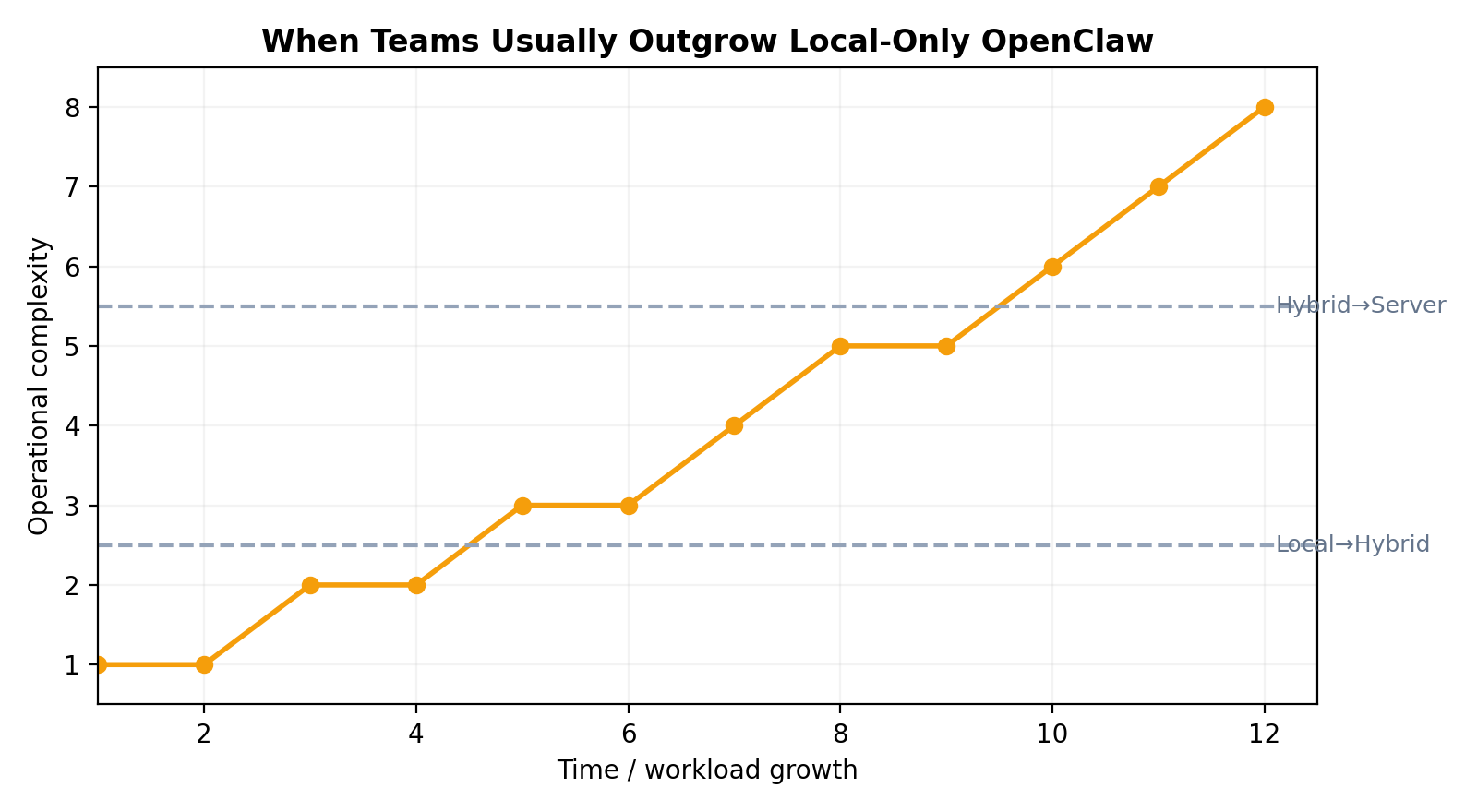
The migration curve is an operational heuristic, not a benchmark.
Move from Local-only to Hybrid when…
- You miss scheduled tasks because your device sleeps/restarts
- You run multi-hour jobs that block your personal machine
- You need dependable monitoring/alerts while offline
- You want separation between “daily laptop mess” and “automation runtime”
Move from Hybrid to Full Server when…
- Queue backlogs become routine
- Task latency spikes during busy windows
- You need near-constant uptime and predictable throughput
- Multiple users/workflows compete for one runtime
- You now care about SLA-like reliability
Move into dedicated GPU territory when…
- You have recurring ML jobs that justify utilization
- Inference latency or model size exceeds CPU-only practicality
- Cloud GPU bills are high enough and consistent enough to evaluate owned hardware
---
Common Pitfalls (That Hurt More Than Underpowered CPUs)
1) Rate limits pretending to be “hardware issues”
You think the machine is slow, but external APIs are throttling you. Symptoms: retries, timeout chains, irregular latency spikes.
Fix: smarter scheduling, request batching, caching, and per-provider backoff.
2) Memory pressure from too many concurrent tasks
Everything works until several long-context tasks run together, then swapping starts and performance falls off a cliff.
Fix: cap concurrency, trim context aggressively, add RAM before adding CPU.
3) Long-running job fragility
Jobs die on laptop sleep, network hiccups, or process restarts.
Fix: move critical runners to always-on environment; add checkpointing/restart logic.
4) Queue backlogs from no prioritization
Low-value periodic tasks clog the queue while high-value work waits.
Fix: set priorities and deadlines; create separate queues for critical vs best-effort tasks.
5) Context bloat
Huge prompts/tool outputs get carried forward unnecessarily, increasing cost and latency.
Fix: summarize intermediate state, store structured artifacts, rehydrate only what’s needed.
6) Storage death by logs and artifacts
You start with “plenty of space,” then logs/temp files quietly consume everything.
Fix: retention policies, log rotation, artifact cleanup routines.
---
Practical Examples
Example A: Solo operator, personal productivity
You want daily news digests, calendar summaries, reminders, and a few automations.
Recommendation:
- Stay local on current laptop/mini
- 8 GB RAM minimum, 16 GB nicer
- Spend zero on new hardware until pain appears
Example B: Founder monitoring 20 competitor/product pages
Checks every 5 minutes, with alerts to chat.
Recommendation:
- Hybrid setup
- Small always-on VPS + local control dashboard
- 4 cores / 8–16 GB on runner is typically enough
Example C: Dev team using OpenClaw for code maintenance + docs
Multiple repos, background refactors, test runs, and PR workflows.
Recommendation:
- Strong local workstations (16–32 GB RAM)
- Shared server runner for long tasks and overnight jobs
- Add observability before adding expensive hardware
Example D: Research-heavy analyst running long synthesis jobs daily
Many source pulls, long contexts, chained tools.
Recommendation:
- Hybrid minimum, likely full server soon
- 32 GB local RAM + robust server runtime
- Strict queue controls and context hygiene
Example E: Applied ML team integrating OpenClaw into model workflows
Embedding pipelines, batch inference, occasional fine-tuning.
Recommendation:
- Keep orchestration separate from GPU workers
- Rent GPU first, then evaluate ownership based on utilization curves
---
More Real-World User Profiles (Beyond the Obvious Examples)
To make sizing decisions easier, here are additional concrete user types and what they usually need.
Example F: Agency account manager (client reporting + recurring status checks)
Daily pull from ad dashboards, CRM notes, analytics snapshots, then generate weekly summaries.
Typical load: many short API calls, periodic report generation, low compute but high schedule reliability.
Recommendation:
- Hardware: 4 cores, 8–16 GB RAM
- Runtime: hybrid (local + always-on runner)
- Why: reporting jobs tend to fail at the worst time if tied to a sleeping laptop.
Example G: E-commerce operator (catalog + price + stock monitoring)
Track competitor prices, stock changes, review sentiment, shipping notices.
Typical load: frequent polling, diffing structured pages, alert fan-out.
Recommendation:
- Hardware: 4–6 cores, 16 GB RAM, SSD
- Runtime: always-on mini server or small VPS
- Why: this is uptime-sensitive but not compute-heavy.
Example H: Content team (research pipeline + editorial drafts)
Collect references, cluster sources, draft outlines, schedule posts, repurpose content.
Typical load: medium-long contexts, document parsing, many write/read operations.
Recommendation:
- Hardware: 6–8 cores, 16–32 GB RAM, fast SSD
- Runtime: local for writing + server worker for background collection
- Why: avoids context-heavy jobs blocking active editing sessions.
Example I: Security / ops analyst (log triage + incident summaries)
Pull alerts from SIEM, summarize anomalies, enrich with threat intel, route escalation notices.
Typical load: bursty, high-priority, often time-sensitive, many integrations.
Recommendation:
- Hardware: 8 cores, 32 GB RAM
- Runtime: server-first with strict queue priority and retry policies
- Why: missed windows cost more than hardware.
Example J: Recruiter / talent ops (candidate pipeline automation)
Parse applications, sync calendars, send reminders, generate interview packets.
Typical load: low compute, many small automations, heavy calendar/email dependence.
Recommendation:
- Hardware: 2–4 cores, 8 GB RAM
- Runtime: local is fine initially, move to hybrid if volumes increase
- Why: mostly integration choreography, not CPU work.
Example K: Customer support lead (ticket triage + SLA tracking)
Classify incoming tickets, suggest responses, escalate urgent cases, monitor SLA timers.
Typical load: steady stream, medium concurrency, strict timing around queues.
Recommendation:
- Hardware: 4–8 cores, 16 GB RAM
- Runtime: hybrid or server-first depending on support volume
- Why: SLA automation needs reliability more than raw compute.
Example L: Quant / data analyst (batch pipelines + recurring model refresh)
Run nightly feature pipelines, regenerate dashboards, produce morning digests.
Typical load: predictable heavy windows, large local artifacts, occasional CPU spikes.
Recommendation:
- Hardware: 8–12 cores, 32+ GB RAM, NVMe
- Runtime: server runner for scheduled jobs; local for exploration
- Why: keeps heavy batch jobs from disrupting daytime interactive work.
Example M: Indie founder building a product with OpenClaw in the loop
Mix of customer ops, coding, analytics, marketing automation, and monitoring.
Typical load: chaotic mixed workload, changing bottlenecks week to week.
Recommendation:
- Start: laptop + cheap VPS (hybrid)
- Upgrade trigger: when overnight jobs collide with dev tasks or queue delays become normal
- Why: mixed workloads punish single-machine setups quickly.
Example N: Team with strict compliance requirements
Needs audit logs, access controls, stable retention, and incident traceability.
Typical load: maybe not heavy compute, but high operational rigor.
Recommendation:
- Hardware: less important than architecture
- Runtime: server-first with centralized logging, backups, and access boundaries
- Why: governance requirements usually force infrastructure choices before performance does.
Decision Checklist: What Should You Run?
Use this quick framework:
- How many hours/day must tasks run unattended?
- <2 hours: local is fine
- 2–8 hours with reliability needs: hybrid
- 24/7 critical: server-first
- How often do you run long jobs (>30 min)?
- Rarely: local
- Daily: hybrid
- Constantly/parallel: server
- What happens if a task fails at 3 AM?
- Nothing urgent: local/hybrid okay
- Real consequence: server + monitoring required
- Are you hitting RAM limits (swap, stutter, crashes)?
- Yes: add RAM now
- No: don’t panic-buy CPU
- Are external rate limits your real bottleneck?
- If yes, optimize request strategy before hardware upgrades
- Do you truly need GPU?
- Only if model workload demands it repeatedly
- If uncertain, rent first
- Is your queue regularly backlogged?
- Introduce prioritization and task segmentation before scaling compute
- Can your current setup survive reboot/sleep/network blips?
- If not, move critical workflows to always-on infrastructure
---
Final Take
Most people start asking this question expecting a shopping list. What they really need is an operating model.
OpenClaw is happiest when you match infrastructure to workload maturity:
- Start local while you learn your patterns
- Move to hybrid when reliability and long-running tasks appear
- Go full server when uptime and throughput become business-critical
- Treat GPU as a separate economics problem, not a default upgrade
If you remember one thing, make it this:
Upgrade architecture before hardware, and upgrade RAM before bragging-rights CPU.
That one rule saves money, reduces operational surprises, and keeps your stack boring.
References
- OpenClaw Docs. System Requirements.
- OpenClaw Docs. Getting Started.
- OpenClaw Documentation. FAQ.