
Abstract
How do you turn "let an AI team research this" into a system that can be inspected, stopped, resumed, and evaluated? AutoGen multi-agent research systems are useful to study because the framework exposes the pieces that often stay hidden in agent demos: agent boundaries, message routing, shared context, tool execution, team topology, and termination rules.
As of June 2026, the Microsoft AutoGen repository carries a maintenance-mode notice and recommends Microsoft Agent Framework for new projects. That matters operationally. The durable lesson is still architectural: AutoGen shows how a research assistant can be decomposed into message-handling agents instead of one large prompt that tries to plan, browse, read, compute, critique, and write at the same time.
For background on tool protocols, read the MCP architecture guide. For higher-level enterprise topologies, read the supervisor graph article. AutoGen sits at the implementation layer: it gives concrete APIs for agents, teams, tools, workbenches, runtimes, traces, and state.
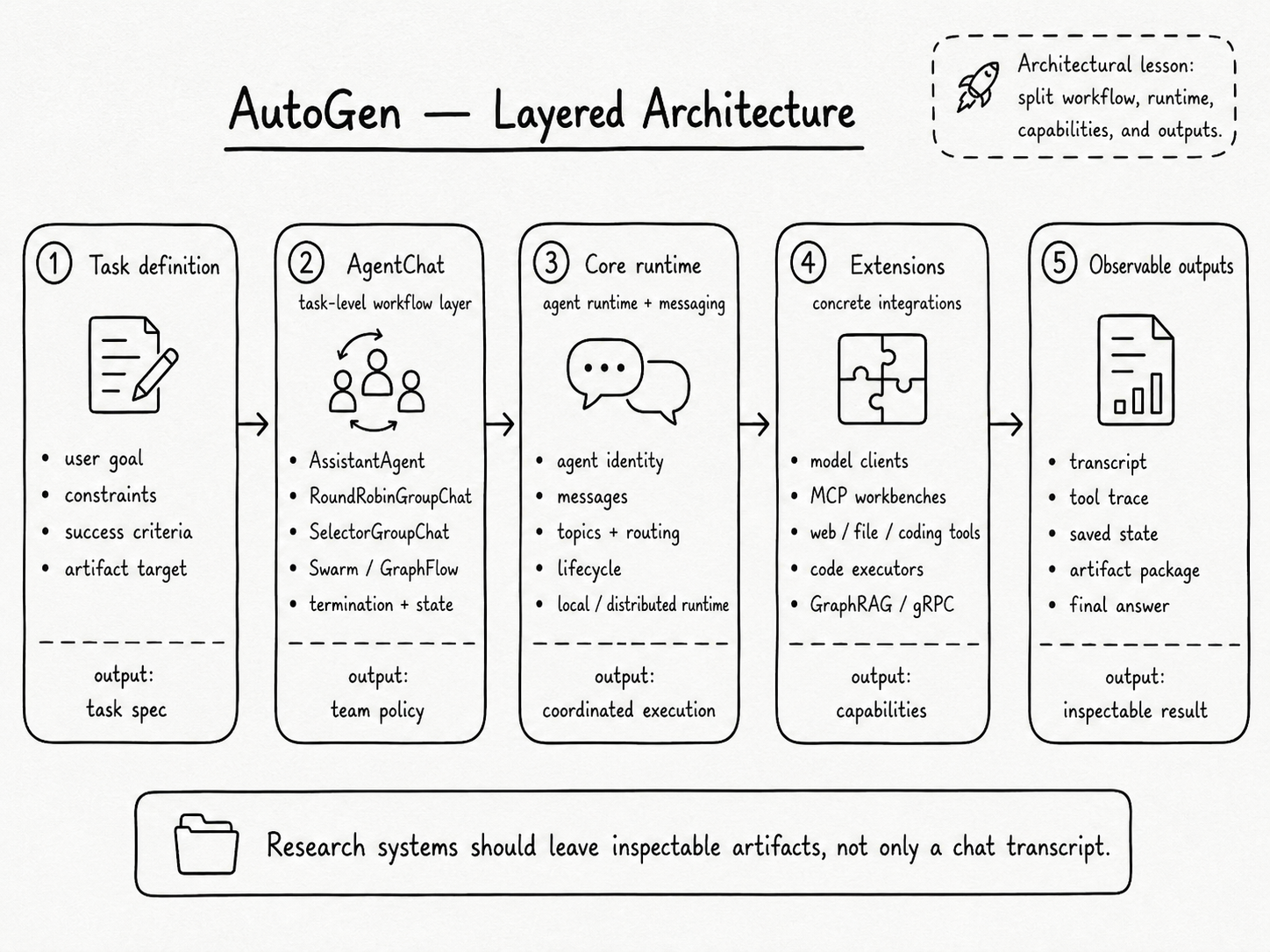
1. What AutoGen Is
AutoGen is a framework for creating multi-agent AI applications. It arranges model calls, tool calls, and message passing into repeatable workflows.
The current Python stack is easiest to understand as three layers:
| Layer | Role | What it gives you |
|---|---|---|
| Core | Agent runtime and messaging substrate. | Agent identity, lifecycle, direct messages, publish-subscribe topics, local and distributed runtimes. |
| AgentChat | Task-level interface for common agent patterns. | AssistantAgent, RoundRobinGroupChat, SelectorGroupChat, Swarm, GraphFlow, termination conditions, state save/load. |
| Extensions | Integrations and concrete components. | OpenAI/Azure model clients, MCP workbenches, web/file/coding agents, code executors, GraphRAG tools, gRPC runtimes. |
That separation matters. A research copilot usually begins as a chat loop, then grows into browser access, PDF reading, code execution, retrieval, human review, and evaluation. AutoGen encourages smaller components with explicit contracts.
In Core, an agent is a stateful software entity that receives messages and acts in response. In AgentChat, a team is a task runner that coordinates multiple agents toward one result. In Extensions, a tool or workbench connects agents to the outside world.
2. The Agent Is a Contract Around a Model Call
Start with the individual agent contract before the group chat.
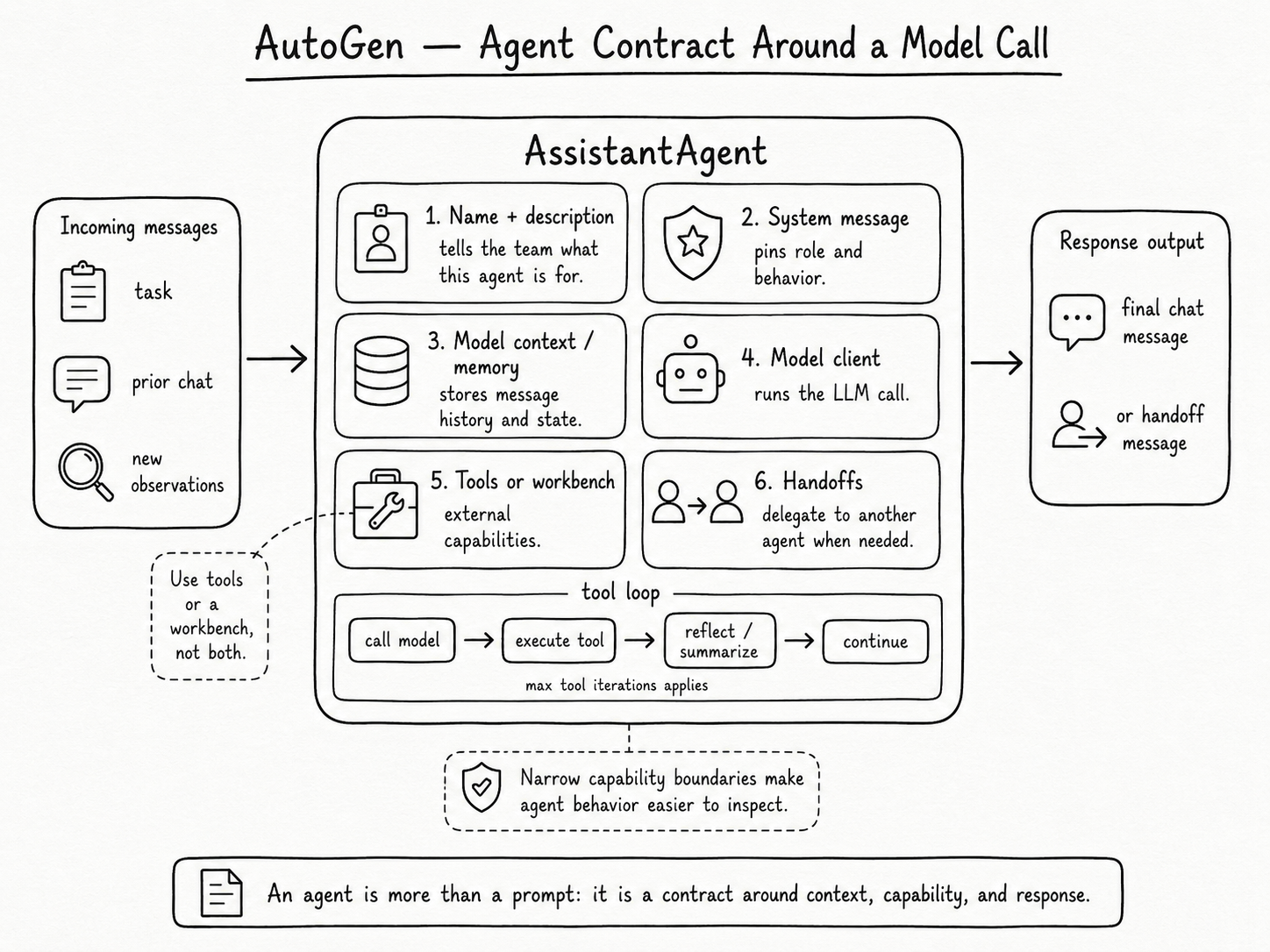
An AssistantAgent wraps a model client, a system message, model context, optional memory, tools or workbenches, handoffs, streaming behavior, and output handling. When the agent receives new messages, it updates context, calls the model, executes requested tools, summarizes or reflects on results, and returns a final chat message or handoff message.
That design gives each agent a narrow job. The name and description tell a team selector what the agent is for. The system message pins behavior. The model client controls inference. The model context controls state. Tools, workbenches, tool-iteration limits, and handoffs define what the agent can do beyond text generation.
For a research workflow, the "reader" agent can have source-grounding instructions and no shell access. The "coder" agent can execute analysis scripts in a sandbox and avoid writing prose. The "critic" agent can receive the final evidence table and check support. The model may still make mistakes, but the system boundary is easier to reason about.
3. Teams Turn Agents Into a Workflow
AutoGen's AgentChat layer provides several team patterns. The simplest is RoundRobinGroupChat: each participant speaks in order and broadcasts messages to the shared group context. It works well for predictable review loops, such as writer -> critic -> writer -> critic.
SelectorGroupChat adds a model-based speaker selector. After each turn, the manager reviews shared context, participant names, and participant descriptions, then selects the next speaker. That helps when the planner may need the web searcher, data analyst, file reader, or writer depending on what has already been found.
Swarm moves the decision closer to the agents. Agents hand off through a special tool-like action, which fits workflows where local expertise should decide the next owner.
GraphFlow gives stricter workflow control through a directed graph. It supports sequential chains, parallel fan-out, joins, conditional branches, and loops with exits. For research systems, GraphFlow fits reproducible stages: collect sources, extract evidence, join into a claim table, then run an independent critic before drafting.
The choice is about control:
| Team pattern | Best fit | Risk to manage |
|---|---|---|
| Round robin | Fixed collaboration loops. | Wasted turns when the next agent has nothing useful to add. |
| Selector group chat | Dynamic task routing with shared context. | Selector mistakes, repeated speakers, and vague participant descriptions. |
| Swarm | Local handoffs between specialists. | Hidden delegation paths unless handoffs are logged clearly. |
| GraphFlow | Reproducible workflows with known stages. | More up-front workflow design. |
| Magentic-One | Open-ended web and file tasks. | Tool safety, browser side effects, and cost budgets. |
4. The Runtime Is the Hidden System Design
Agent demos often show a transcript. AutoGen's deeper contribution is the runtime beneath it. Core uses an actor-style programming model: agents have identities, receive messages, publish messages to topics, and subscribe to topics they care about. The standalone SingleThreadedAgentRuntime processes messages through an asyncio queue for local or single-process applications. The distributed model separates hosts and workers while preserving the same agent abstraction.
AgentChat teams map participants into this runtime. A group chat creates a team id, participant topics, a group topic, a manager topic, and an output topic. Participants subscribe to their own topic and the shared group topic. The manager tracks the message thread, chooses the next speaker, applies termination conditions, and emits output messages.
That explains why multi-agent systems need more than "agent A talks to agent B." They need identity, routing, shared context, ordering, and observability: which agent owns state, who receives each message, which messages become visible, which handler runs next, and which model or tool call caused the result.
For research copilots, routing and state are practical concerns. A reader may keep source summaries, an analyst may keep execution artifacts, and a team manager may keep the task transcript. Mixing those states casually causes duplicated work, stale claims, and expensive context growth.
5. Tools and Workbenches Are Capability Boundaries
AutoGen treats tools as first-class components. A plain tool exposes a callable capability. A workbench exposes a managed collection of tools that can share resources and state.
This distinction matters for research systems. Web search can be a stateless tool. Persistent browsing is better as a workbench because browser state and lifecycle matter. Code execution needs an executor or workbench because files, dependencies, and cleanup must be managed. Vector index access should stay narrow and schema-driven. File exploration often works better as an agent with tools because navigation and summarization require context.
Tool access is the real permission system. A planner with no tools can make bad plans but cannot mutate a repository. A coder with shell access can create artifacts and side effects. The secure-local-agent patterns covered in capability gating and audit trails apply here: gate high-risk tools, log arguments and results, and require human approval for irreversible operations.
6. A Research Copilot Design From AutoGen Primitives
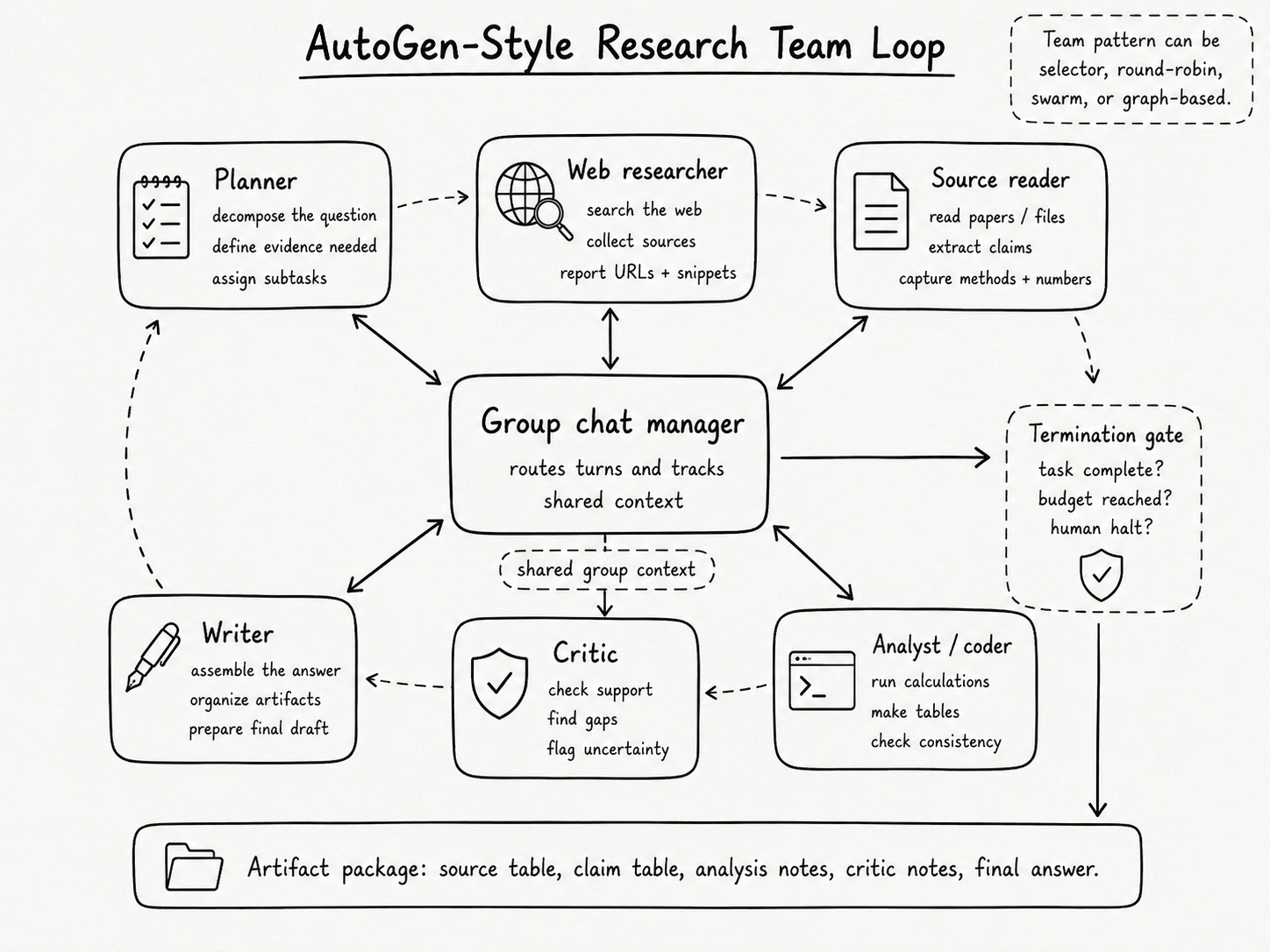
A practical AutoGen-style research assistant can start with five agents:
| Agent | Responsibility | Tool access |
|---|---|---|
| Planner | Decompose the question, define evidence needed, assign subtasks. | None or read-only task state. |
| Web researcher | Search, collect candidate sources, report URLs and snippets. | Browser/search workbench. |
| Source reader | Extract claims, methods, numbers, limitations, and citations. | PDF/file reader, retrieval index. |
| Analyst | Run calculations, tables, and consistency checks. | Sandboxed code executor. |
| Critic | Check whether the answer is supported and identify missing evidence. | Read-only access to sources and trace. |
The team topology depends on the task. A quick explainer can use selector group chat. A regulated report should use GraphFlow: plan -> parallel source extraction -> evidence table -> analysis -> critic -> writer. A long-running autonomous study can use a Magentic-One-style orchestrator with task and progress ledgers.
The output should be an artifact package: research plan, source table, claim table, tool trace, critic notes, and final answer. Transcript alone is too weak for review. The answer can be wrong, but the system leaves enough structure to inspect source selection, extraction, calculation, synthesis, or final wording.
7. Evaluation: Measure the Team, Not the Conversation
AutoGen includes AutoGenBench for repeated task runs under controlled initial conditions, and the broader codebase logs messages, tool events, model events, and team outputs. Evaluate the workflow as a system. Transcript quality is a weak proxy. Better metrics include:
| Metric | What to inspect |
|---|---|
| Source recall | Did the team find the required sources? |
| Evidence precision | How much retrieved material actually supports the final answer? |
| Claim support | Does each final claim map to a source span or computed result? |
| Tool budget | How many search, browser, code, and model calls were used? |
| Stop quality | Did termination happen because the task was complete, budgeted out, or manually halted? |
Termination conditions deserve special attention. AutoGen exposes message-count limits, text mention stops, token limits, timeouts, handoff stops, and custom conditions. Good stopping logic combines budget limits with task-specific completion checks.
The same principle applies to state. Saving and loading agent or team state enables pause/resume workflows, human review checkpoints, and audit trails.
AutoGen's best teaching value is that it makes agent architecture concrete. A multi-agent research system is a set of stateful agents, a routing layer, a team policy, a tool boundary, a stopping rule, and an artifact trail. The model is only one component.
The practical design move is to start with the workflow artifact you need at the end. Then choose the smallest team topology that can produce it with inspectable evidence: one agent with tools for simple tasks, round-robin for fixed review loops, selector group chat for dynamic routing, GraphFlow for reproducible stages, and orchestrator-led teams for open-ended web and file work.
References
- Microsoft AutoGen repository. AutoGen README, commit `027ecf0`.
- Microsoft AutoGen. AutoGen Core package README.
- Microsoft AutoGen. AutoGen AgentChat package README.
- Microsoft AutoGen. `AssistantAgent` implementation.
- Microsoft AutoGen. `BaseGroupChat` implementation.
- Microsoft AutoGen. `Workbench` interface.
- Microsoft AutoGen. AutoGenBench package README.