Category: Evaluation & Observability
Claude Code is most useful when it can inspect a codebase, run commands, and apply edits quickly. That same local access is also where most risk lives. Once an agent can execute shell commands and touch files, security becomes less about a single “allow/deny” switch and more about layered controls: what the model may attempt, what the runtime actually enforces, when humans are asked to approve, and how much blast radius remains if a bad command slips through.
The practical evaluation starts with Claude Code’s local safety model: permission modes, rule precedence, sandbox boundaries, and approval workflows. For real developer machines or CI-like environments, the important question is what those controls enforce and where residual risk remains.
---
1) The safety stack in Claude Code: policy + prompts + runtime isolation
Claude Code’s local safety posture is not one mechanism; it is a stack:
- Permission policy layer (allow/ask/deny rules, permission mode) controls when tool calls are permitted automatically versus blocked or escalated.
- Approval prompts provide interactive human gating for operations outside the currently allowed set.
- Sandboxing (filesystem and network constraints enforced by host OS/container primitives) limits what shell commands can do even after approval.
- Working-directory boundaries constrain default write behavior to the project scope.
A useful mental model is:
- Permissions decide intent authorization (“may Claude try this tool/action?”)
- Sandbox decides execution capability (“if attempted, what can the process actually reach?”)
When teams conflate these, they typically over-trust permission prompts and under-invest in runtime isolation.
---
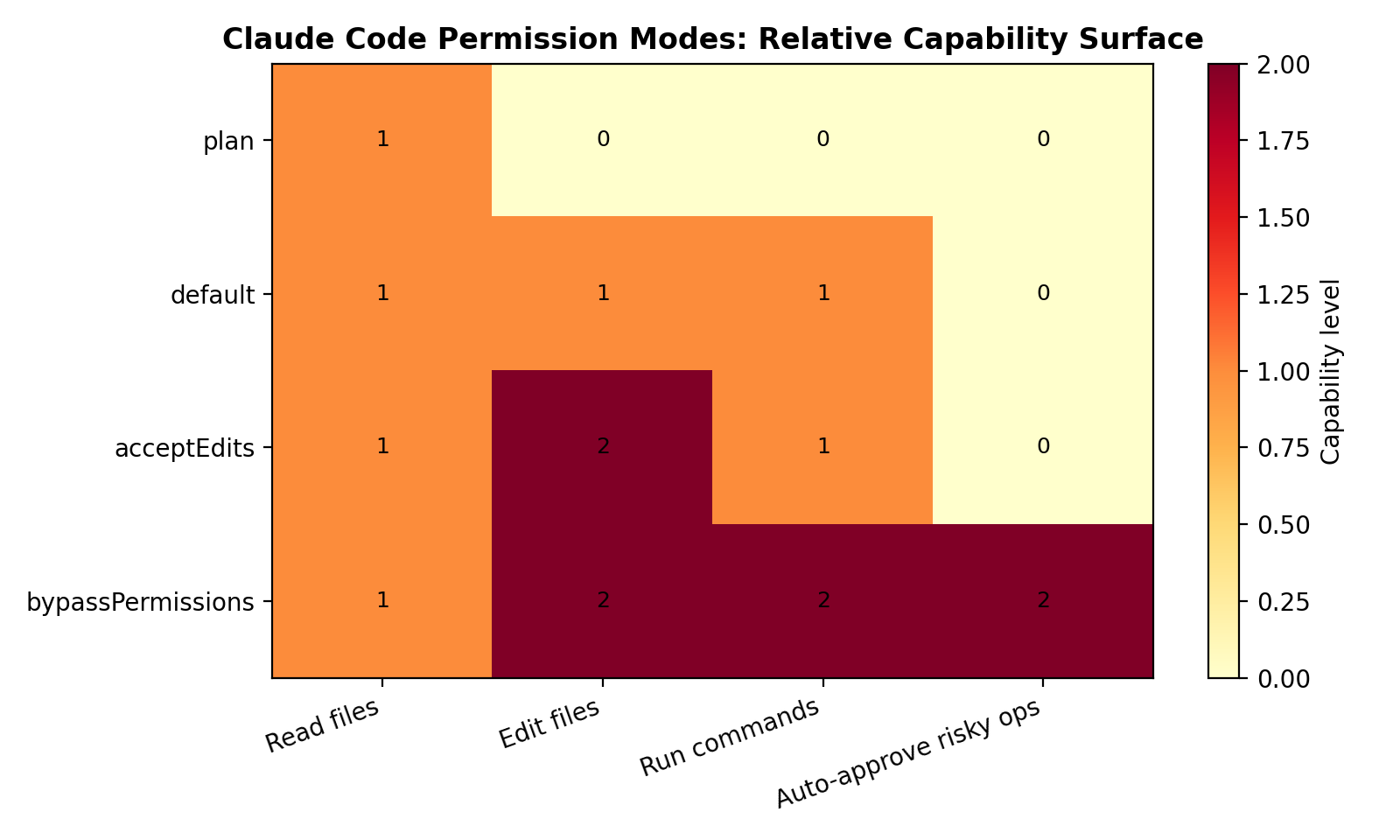
2) Permission modes in practice: default, acceptEdits, plan, bypassPermissions
Claude Code exposes permission modes to set the session’s baseline behavior. The docs describe these modes directly:
- `default`: standard behavior with permission prompts on first use of each tool.
- `acceptEdits`: automatically accepts file edit permissions for the session.
- `plan`: analysis-only mode; Claude can inspect/analyze but cannot modify files or execute commands.
- `bypassPermissions`: skips permission prompts (explicitly documented as requiring a safe environment).
How to interpret them operationally
- `plan` is your safest interactive mode for architecture review, impact analysis, and drafting change plans. It is effectively a “no side effects” mode.
- `default` is a balanced mode for day-to-day work when a human is present and paying attention to prompts.
- `acceptEdits` improves flow when edit churn is high, but it removes one class of friction guard (write confirmations). Teams should pair it with stronger sandbox defaults and tighter command rules.
- `bypassPermissions` is only defensible in high-trust, high-isolation contexts (ephemeral environment, constrained network egress, no sensitive host material, and recoverable workspace). Treat it as an operational exception, not a convenience default.
The mistake pattern is using “fewer prompts” as a productivity goal without compensating controls. If you relax approval friction, you must tighten environment isolation and policy scope.
---
3) Rule evaluation order: deny -> ask -> allow (first match wins)
Claude Code permission rules are evaluated with explicit precedence:
`deny -> ask -> allow`, with the first matching rule taking effect.
This ordering is security-significant.
Why this precedence matters
- Deny-first prevents accidental privilege expansion. A broad allow rule does not override a narrower explicit deny if the deny matches first.
- Ask sits between hard block and silent allow. It is useful for “sometimes yes” tools (e.g., package install, networking, or deployment commands).
- Allow should be smallest-scope possible. Broad “allow shell” style patterns create invisible risk, especially as prompts and model behavior evolve over time.
Practical rule design pattern
Use rules in this order intentionally:
- Deny known dangerous classes (credential files, destructive shell patterns, production deployment commands if not intended).
- Ask for medium-risk operations (networked commands, dependency changes, process control, scripts with unknown side effects).
- Allow tightly scoped low-risk operations (read-only inspections, deterministic local checks, project-specific safe commands).
In review terms: if your allow section is much larger than your deny+ask sections, you likely inverted your risk posture.
---
4) Approval prompts and policy config surface
Claude Code provides an explicit permissions management surface (including /permissions) and sources rules from settings configuration. In practice this gives teams two control planes:
- Interactive plane: approve/deny during active sessions.
- Declarative plane: persist organization or project policy in configuration (for repeatable, auditable behavior).
What approval prompts are good at
- Blocking surprising one-off actions in interactive use.
- Forcing explicit intent acknowledgment on risky operations.
- Giving developers visibility into what the agent wants to do next.
What approval prompts are bad at
- Defending against long sessions with many repetitive prompts (approval fatigue).
- Enforcing consistent policy across teams by themselves.
- Compensating for weak sandboxing.
Approval prompts should be treated as human-in-the-loop exception handling, not the primary technical boundary. The durable boundary comes from sandboxing and conservative policy defaults.
---
5) Sandboxed bash: what it means and where boundaries are
Claude Code’s sandboxing guidance emphasizes that command execution risk is not only about “what command text was generated,” but also about what subprocesses can touch on disk/network once launched. The core concept is sandboxed bash with OS-level enforcement of filesystem and network restrictions.
Anthropic describes this as layered protection against prompt injection and high-impact command execution, using host-level primitives (for example, macOS Seatbelt and Linux bubblewrap) to enforce constraints on command subprocesses.
Key isolation boundaries
- Filesystem isolation
- Default write behavior is scoped to the current working directory (and subdirectories).
- Writes outside that scope are blocked unless explicitly configured.
- This boundary applies to subprocesses too, not just Claude’s direct file tools.
- Read/write asymmetry
- Claude Code may read broadly (with documented blocked paths), but write permissions are intentionally narrower by default.
- This asymmetry is useful: broad context, narrow mutation.
- Network isolation
- Sandboxing docs and engineering notes emphasize egress control as a distinct layer.
- This matters because data exfiltration usually needs outbound channels; filesystem controls alone are not enough.
- Working-directory boundary
- Project root becomes the practical blast-radius limit for default edits.
- If your secrets or unrelated assets live outside project scope, default write constraints reduce accidental corruption risk (though not all read/exfiltration risk).
Critical operational takeaway
Permission approval without strong sandbox configuration can still yield high-impact outcomes. Conversely, even with permissive approval settings, strong sandbox constraints can significantly reduce worst-case damage.
---
6) Read/write scope behavior and project boundary
Claude Code’s documentation highlights an important behavior pattern:
- Default writes: bounded to current working directory and descendants.
- Default reads: broader machine visibility (with some denied directories), useful for dependencies/libraries/context.
This is a pragmatic developer tradeoff. Agents need context to reason well, but unrestricted writes across the host would be too risky.
Security implications
- Good: limits accidental or malicious host-wide file mutation.
- Still risky: broad reads can expose sensitive material if local machine hygiene is weak (e.g., plaintext secrets in nearby paths, shell histories, token files in readable locations).
- Mitigation: combine read hygiene (secret managers, reduced local secret sprawl) with network restrictions and command policy.
Working-directory boundaries help, but they are not a full data-loss prevention system.
---
7) Risk Analysis
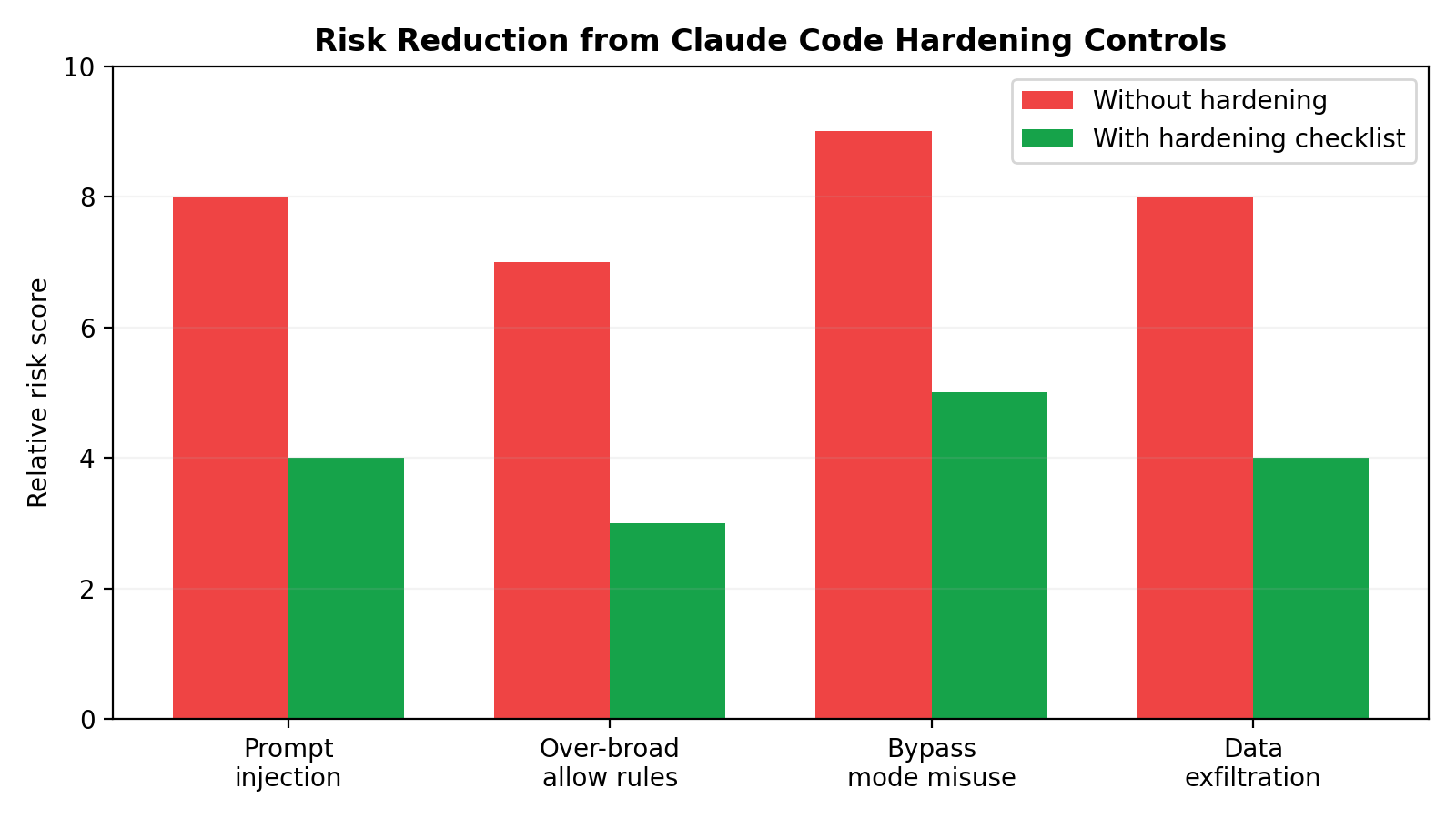
Claude Code deployments need concrete risk analysis around prompt injection, command execution, secret exposure, and approval drift.
7.1 Prompt injection risk
Threat: Claude consumes untrusted content from code, docs, issue text, generated logs, or copied snippets containing adversarial instructions (“ignore policy,” “run this curl | sh,” “print secrets for debugging”).
How it manifests in Claude Code:
- The model proposes risky commands that appear task-related.
- It requests tools that expand access beyond expected scope.
- It chains benign-looking reads into sensitive discovery.
Mitigations:
- Prefer
planmode for first-pass analysis of untrusted repos. - Keep risky tool classes in
askordeny, not broadallow. - Use sandboxed bash with egress limits so injected instructions cannot easily exfiltrate.
- Require human review for commands involving shells, package scripts, remote fetch/execute, or credential paths.
7.2 bypassPermissions misuse risk
Threat: Teams enable bypassPermissions for convenience in persistent developer environments containing real credentials and broad host access.
Why this is high-impact:
- Eliminates interactive friction that might otherwise catch abnormal actions.
- Increases consequences of prompt injection or model mistakes.
- Encourages policy drift (“it worked fine before”) until an incident occurs.
Mitigations:
- Restrict
bypassPermissionsto isolated, disposable environments. - Pair with strict filesystem/network sandboxing and minimal secrets exposure.
- Time-box usage and document explicit conditions of use.
- Prefer
default/acceptEditsfor normal local workflows.
7.3 Over-broad allow rules risk
Threat: Overly general allow rules (especially for shell operations) silently grant large capability surfaces.
Why it happens:
- Teams optimize for less interruption.
- Rule sets grow organically without periodic pruning.
- Developers assume model “intent quality” substitutes for policy precision.
Mitigations:
- Keep allow rules command-scoped and task-scoped.
- Add explicit deny rules for dangerous command classes and sensitive paths.
- Use ask rules as the default for ambiguous tools.
- Review rule sets regularly as codebase/tooling evolves.
7.4 Data exfiltration paths and mitigations
Common exfil paths in local-agent contexts:
- Outbound HTTP(S) requests from shell commands.
- Package/install hooks contacting remote infrastructure.
- Upload-like operations hidden inside helper scripts.
- Copying sensitive content into logs/artifacts then syncing externally.
Mitigation strategy (layered):
- Network controls: default-deny or domain-restricted egress where possible.
- Filesystem controls: keep sensitive stores outside allowed write scope; reduce readable secret sprawl.
- Permission policy: deny/ask for network and shell patterns with transfer behavior.
- Human gate: review commands that combine sensitive reads + outbound operations.
- Environment design: run high-risk tasks in disposable workspaces with short-lived credentials.
No single control is sufficient. Exfiltration defense depends on simultaneous restrictions across policy, runtime, and environment.
---
8) Hardening Checklist (actionable)
Use this as an implementation baseline for Claude Code local deployments.
Baseline mode and approvals
- [ ] Set session default to `default` (or `plan` for discovery/review phases).
- [ ] Use `acceptEdits` only when edit velocity justifies it and sandboxing is in place.
- [ ] Reserve `bypassPermissions` for isolated, explicitly approved environments.
- [ ] Require human approval for shell/network operations unless tightly scoped and pre-reviewed.
Permission rules
- [ ] Implement deny-first policy for known dangerous classes.
- [ ] Use ask for medium-risk tools/commands rather than broad allow.
- [ ] Keep allow rules narrow and explicit; avoid wildcard-style shell allowances.
- [ ] Periodically audit rule sets for creep and dead exceptions.
Sandboxing and boundaries
- [ ] Enable sandboxed command execution with OS-level enforcement.
- [ ] Constrain writes to project working directory by default.
- [ ] Only grant extra write paths when strictly required.
- [ ] Apply network isolation/egress constraints appropriate to task sensitivity.
Secret and host hygiene
- [ ] Remove plaintext secrets from broadly readable local paths.
- [ ] Use short-lived credentials and scoped tokens.
- [ ] Separate sensitive non-project data from active agent workspace.
- [ ] Prefer ephemeral environments for untrusted code analysis.
Operational safeguards
- [ ] Log permission changes and review them in code review/security review.
- [ ] Document approved usage patterns for each permission mode.
- [ ] Train users to treat approval prompts as security decisions, not UI friction.
- [ ] Rehearse incident response for suspected prompt injection or exfil attempts.
---
9) Evaluation guidance: what to observe in real deployments
If you are evaluating Claude Code safety controls in your org, focus on observable behaviors rather than assumed settings.
- Mode drift: Are teams actually running
default/plan, or hasbypassPermissionsbecome the informal standard? - Rule quality: Do deny/ask/allow sets reflect explicit threat models, or ad-hoc convenience exceptions?
- Prompt burden: Are users seeing manageable high-signal prompts, or high-volume noise leading to blind approvals?
- Sandbox efficacy: Can subprocesses actually write/exfiltrate beyond intended scope in realistic tests?
- Boundary integrity: Does working-directory confinement hold under common tooling patterns (build scripts, package hooks, helper binaries)?
A mature setup treats these as ongoing observability metrics, not one-time configuration tasks.
---
10) Practical deployment patterns
Pattern A: Daily local development (balanced)
- Mode:
default - Rules: deny high-risk commands/paths, ask for shell/network changes, allow limited low-risk read tools
- Sandbox: enabled, writes confined to project scope
- Result: good productivity with meaningful checkpoints
Pattern B: Large refactor sprint (higher throughput)
- Mode:
acceptEdits - Rules: still deny dangerous classes; ask for shell/network and environment-altering actions
- Sandbox: strict filesystem + controlled egress
- Result: faster edit loops without surrendering core boundaries
Pattern C: Untrusted repository triage (defensive)
- Mode:
planinitially; escalate only after review - Rules: conservative ask/deny posture
- Sandbox: strongest isolation profile available
- Result: minimizes exposure during reconnaissance phase
Pattern D: Fully automated pipeline worker (exceptional)
- Mode: potentially
bypassPermissionsin narrow contexts - Rules + sandbox: highly constrained and codified, ephemeral runtime, minimal secrets, audited outputs
- Result: operationally viable only with strong environmental controls and clear ownership
---
Conclusion
Claude Code’s local safety mechanisms are strongest when used as a coordinated system:
- Permission modes set operational intent.
- Rule precedence (
deny -> ask -> allow) defines policy behavior under ambiguity. - Approval prompts keep humans in the loop for uncertain actions.
- Sandboxed bash and working-directory boundaries reduce blast radius when commands execute.
For most teams, the practical target is not “zero prompts” or “maximum autonomy.” It is high-confidence autonomy: enough flow to be productive, enough constraints to remain resilient under prompt injection, policy mistakes, or human approval fatigue.
If you treat bypassPermissions and broad allow rules as defaults, you shift risk from visible friction to invisible exposure. If you combine conservative policy with runtime isolation and periodic review, Claude Code can remain both fast and defensible in real engineering environments.
---
References
- Claude Code Docs — Security: https://code.claude.com/docs/en/security
- Claude Code Docs — Configure permissions: https://code.claude.com/docs/en/permissions
- Claude Code Docs — Sandboxing: https://code.claude.com/docs/en/sandboxing
- Anthropic Engineering — Claude Code Sandboxing: https://www.anthropic.com/engineering/claude-code-sandboxing
- Backslash Security — Claude Code Security Best Practices: https://www.backslash.security/blog/claude-code-security-best-practices